
Quick answer
If your TEST Mode setup keeps surfacing too many vague, low-value candidates, the fix is usually not more complexity. It is usually less. Tightening a noisy setup means making the settings easier to understand, easier to review, and more selective about what deserves attention in the first place.
A good TEST Mode setup should become clearer after a few review cycles, not more chaotic.
What a noisy workflow usually feels like
A noisy setup does not always look dramatic. Sometimes it just feels tiring. After a few review cycles, the warning signs usually look like this: too many surfaced candidates feel interchangeable, you keep writing vague review notes, very few surfaced candidates feel clearly worth a next step, the output creates more checking work than useful insight, and you are not getting better at explaining why the workflow is helpful.
A TEST Mode workflow does not need to become perfect quickly. But it should become easier to explain. If it still feels confusing after several calm review passes, the setup's job is often too loose.
Choose one lever based on the noise type
Not all noise is the same. Type A is too much borderline output: many candidates look active, but only a few feel worth attention. The setup may be too permissive. Type B is output that is hard to compare: some candidates look meaningful, others feel random, and review notes do not show a clear pattern. Type C is output that creates effort without direction: the setup keeps giving you things to inspect, but very little structure for what deserves follow-up.
Once you know the noise type, pick one lever, not three. If the problem is Type A, try raising the main trigger threshold, requiring a cleaner last-candle volume multiplier, or narrowing the market universe. If the problem is Type B, tighten the setup's stated job, add a movement-quality filter like the gain/loss versus amplitude check, or remove one muddying secondary condition. If the problem is Type C, reduce the number of markets monitored, use the exclusion list, increase the delay between repeat triggers, or simplify the review question so every candidate gets the same first test.
A concrete PriceWatch anchor
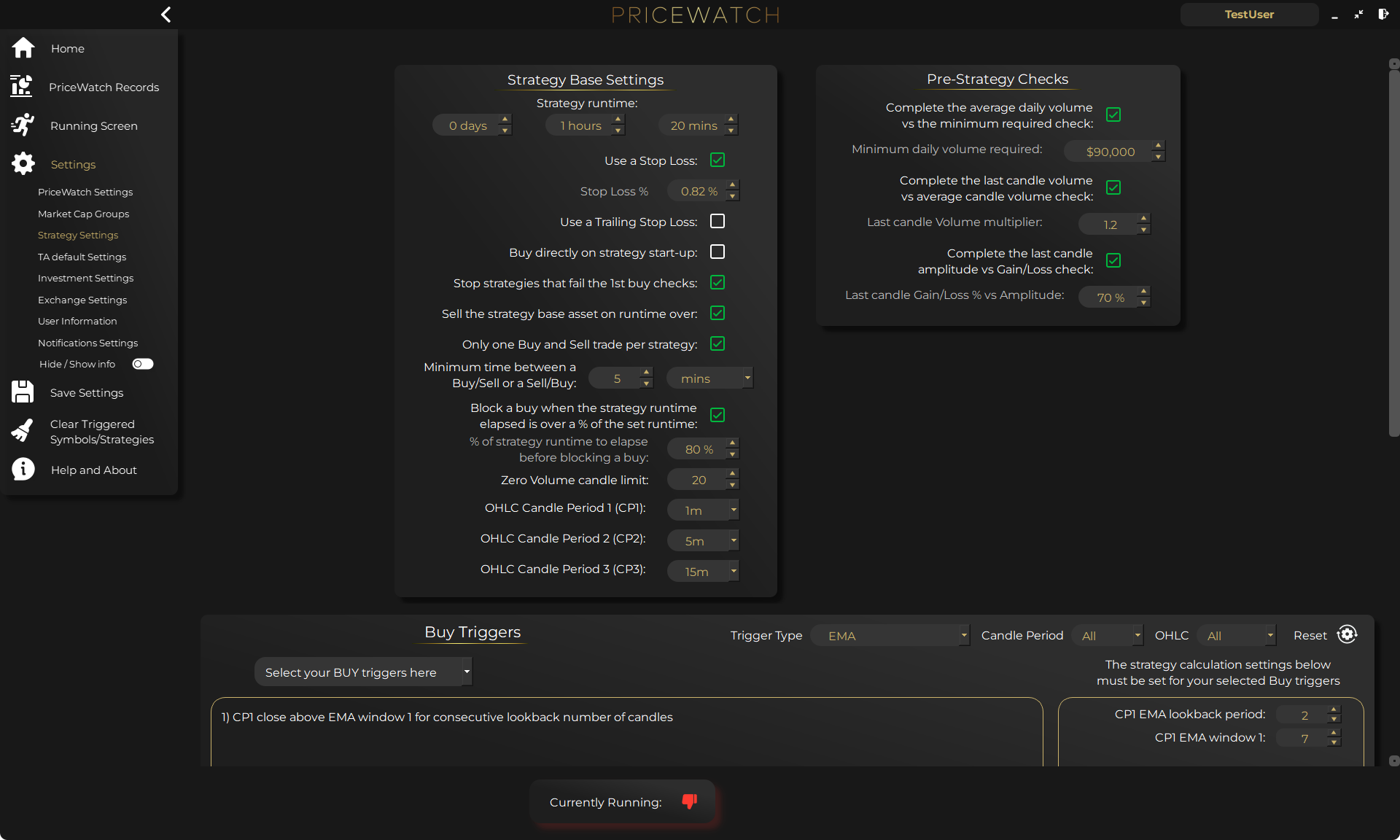
In PriceWatch, a practical tightening pass often happens on the main settings screens: whether you are monitoring all markets for the selected quote asset or a narrower set, whether selected markets or exclusions would suit the job better, which short-term price triggers are active, whether the pre-strategy checks are loose or strict, and whether the delay between repeat triggers needs to give you more breathing room.
That makes tightening less abstract. You are not trying to become smarter by force. You are changing one operational lever and then watching what it does.
How to tighten this inside PriceWatch
The safest tightening pass in PriceWatch is operational, not emotional. If the setup is noisy, change one real lever at a time: raise the main price-change trigger so weaker moves surface less often, tighten one pre-strategy validation check, narrow the monitoring universe by changing the quote asset scope or moving to a selected markets list, use Market Cap Groups more selectively if your tier allows, add repeat weak names to the exclusion list, and leave the rest of the setup alone for the next review window.
Then use the Live Feed and later the Records Screen to compare the before-and-after effect. If the candidate count fell but the output is still hard to explain, you probably made the setup quieter without making it clearer.
Use a before-and-after evaluation template
Keep the comparison boring and explicit. A two-column note is enough.
- Before change: what felt noisy? After change: what improved, if anything?
- Before change: what one lever changed? After change: did clarity improve or just volume drop?
- Before change: what effect did you expect? After change: what effect did you actually observe?
Start with one lever
Choose one clear change, run another review cycle, and compare whether the output became easier to explain, not only quieter.
Avoid overfitting to one bad day
If you tighten a workflow because one review cycle felt messy, you can end up fitting the setup to a short stretch of market behaviour instead of improving it. That is why several calm review cycles matter. If you are still not sure whether the change helped, the next step is often consistency testing, not more tinkering.
What better output should feel like
After a few useful tightening cycles, the workflow should feel calmer. Better output usually feels like this: you can explain why a surfaced candidate appeared, the stronger names separate more clearly from weaker ones, your notes become more specific, the workflow creates fewer dead-end checks, and you feel more confident about what deserves a next step.
That is real progress.
Why this matters before LIVE
A noisy TEST Mode workflow can create false confidence. It can make you feel busy, engaged, and productive without actually making the process safer. The goal before LIVE is not to prove that the workflow produces activity. The goal is to prove that the workflow produces output you can understand and trust more consistently.
If the setup still feels noisy after several review cycles, that is not failure. It is a sign to keep refining the workflow's job before adding more risk.
Want to see the workflow in practice?
Start by reviewing the workflow in TEST mode
PriceWatch runs locally, helps you monitor broader markets, and gives you a way to review how the workflow behaves before deciding whether moving closer to LIVE use makes sense for you.
Prefer to keep researching first?
Keep learning before you decide
Get practical workflow ideas, product updates, and new articles by email, or keep reading through the blog at your own pace before you take the next step.
Keep the route moving
Best next pages from here
If this article solved only part of the problem, use the closest route below to keep moving through discovery, alerting, trust, and comparison intent without bouncing back to search.
Discovery route
Crypto market scanner
Use the fixed-intent landing page if you want the clearest explanation of scan-first market discovery.
Alerting route
Desktop crypto price tracker
Go here if your main intent is Windows-based monitoring, price alerts, and local desktop workflow.
Trust route
Cloud bot vs local software
Use this when the next question is privacy, key control, and where the workflow actually runs.
Comparison route
PriceWatch vs TradingView
Use the comparison path if you are weighing chart-first analysis against discovery-first monitoring.
Who this is for (and who it is not for)
Good fit if
- You have run TEST Mode for a few review cycles and the output still feels messy.
- You want a calmer, more explainable workflow before moving forward.
- You want to tighten the setup without guessing or redesigning everything.
Not a fit if
- You want a single silver-bullet setting that removes all noise.
- You want to skip the review process and just trust the reduced candidate count.
- You want software to replace judgment rather than support it.
FAQ
Does tightening always mean adding more filters?
No. Sometimes the best change is narrowing market scope, raising a trigger threshold, or simplifying the job of the workflow.
Can a workflow become too quiet?
Yes. If tightening removes too many useful candidates, it can still fail the review test. The goal is clarity, not silence.
How long should I wait between tightening changes?
Ideally one calm review cycle at a time. Chasing every noisy session with a new adjustment creates overfitting problems.
Is volume the best measure of success?
No. The better measure is whether review notes become more specific and the workflow feels easier to explain.